

September 26, 2021
How to Embed Facebook Page Feed on Website: A Quick Guide
X minute read

Social infrastructure that scales with you.
Start your free trial, or let us show you the platform in action.
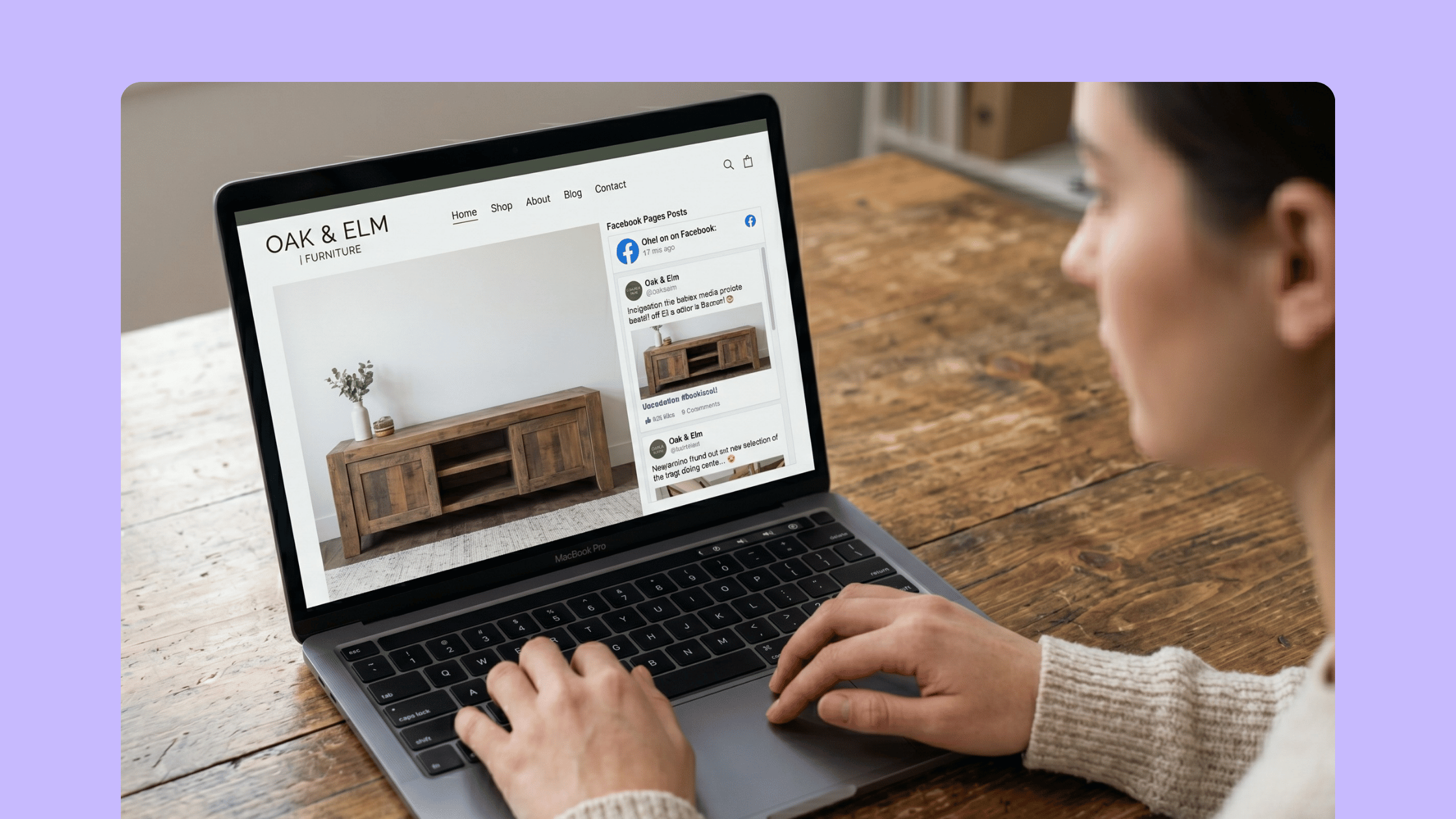
Your Facebook Page stays busy every day. Posts go live, reactions pile up, comments keep coming, and all of that activity builds real proof that people care about your brand. The problem is that most of it never reaches the visitors landing on your website. When you embed a Facebook Page feed on your website, you bring that activity into view, right where buying decisions happen. With users spending several hours of their day on Facebook, your audience is clearly engaged. They just need a reason to look at your site, too.
This guide covers where the standard Facebook Page Plugin falls short, why brands switch to a social media aggregator, and how to set up a branded, multi-platform feed in minutes.
Why Embed Facebook Page Feed on Your Website
A Facebook feed embedded on your website turns passive social activity into visible social proof. Visitors see fresh content, recent posts, and a brand that stays active across channels.
The numbers support this approach. Around 79% of people say user-generated content directly impacts their buying decisions. Product pages featuring customer content convert at an average rate of 102% higher. And Facebook still drives one of the highest engagement rates among major social platforms at 5.07%, well ahead of Instagram and X, making it a strong source of trust signals to display on your site.
Here is what an embedded Facebook page feed actually does for your website:
- Builds trust quickly. New visitors see real posts, reviews, and reactions from an active community.
- Keeps your site feeling fresh. Auto-updating feeds add new content without manual work.
- Drives engagement. Visitors spend more time browsing posts, photos, and videos.
- Supports conversions. Reviews, recommendations, and customer content reduce hesitation at checkout.
- Reinforces brand consistency. A custom-styled feed matches your website design, rather than looking like a third-party widget.
This is why brands from retail, sports, education, and non-profits embed Facebook feed in web page sections across homepages, product pages, events sections, and digital signage.
The Two Main Ways to Embed a Facebook Page Feed
You have two real options. Each works for different needs.
Option 1: The Standard Facebook Page Plugin
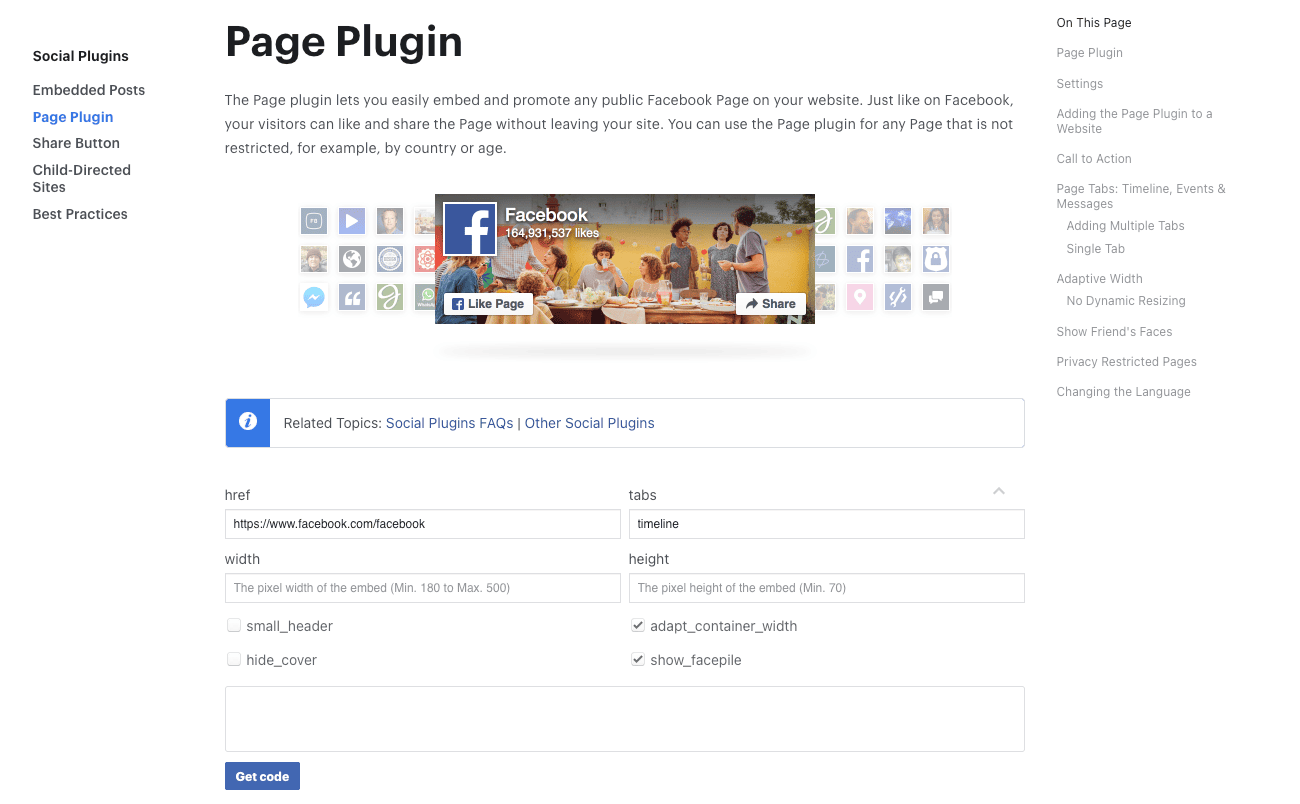
The Facebook Page Plugin is Meta's free embed tool. It generates a small code snippet for any public Page and works on most websites that support HTML embedding.
The plugin handles basic embeds well. You enter your Page URL, set the width and height, and copy the code. The setup takes minutes and costs nothing.
But the plugin has clear limits:
- No design customization. You cannot change colors, fonts, or layouts to match your brand.
- One Page at a time. You cannot combine multiple Pages or mix Facebook with Instagram, TikTok, or YouTube.
- No moderation. Every post on the Page appears, including ones you might prefer to hide on your homepage.
- Fixed size with scrollbars. The plugin uses a fixed-height column, which often creates awkward scroll behavior on mobile.
- Facebook branding. The widget keeps Facebook's UI elements, so the feed never feels native to your site.
For a simple sidebar widget or a small "Find us on Facebook" block, the plugin is enough. For anything more visible, most teams outgrow it quickly.
Option 2: A Social Media Aggregator

A social media aggregator gathers posts from Facebook and other platforms, lets you moderate them, and displays them in custom layouts on your website. Brands like GoPro, Harvard University, and Continental use this approach because it removes every limit of the Page Plugin.
You get full control over design, multi-platform content, moderation, and where the feed appears. The setup still requires no coding. The trade-off is a paid subscription instead of a free widget.
This is the route you take when the Facebook feed becomes a real part of your website experience, not just a side widget.
How to Embed Facebook Page Feed on Website Using Flockler
Flockler is a social media aggregation platform used by over 2,000 organizations worldwide. It collects Facebook Page content through Meta's official API and displays it on websites, apps, intranets, and digital screens. The full setup takes around five minutes.
Here are the four steps to embed the Facebook page feed on website pages with Flockler.
Step 1: Start a Free Flockler Account
Sign up for the 14-day free trial. You get full product access without Flockler branding or ads. No credit card is required at the start.
After signing up, Flockler's setup assistant guides you through creating your first feed.
Step 2: Connect Your Facebook Page
From the source selector, choose Facebook and connect your account. Meta requires this connection through a personal Facebook account, which is standard across all third-party tools that use the official API. Flockler only reads public Page content and never accesses personal posts, messages, or profile data.
Once connected, you can pull in:
- Posts from any public Facebook Page (yours or others, as long as you are an admin on at least one Page)
- Mentions, recommendations, and reviews from Pages you manage
- Content from your Page's Community tab
You can also add Instagram, TikTok, YouTube, LinkedIn, X (formerly Twitter), Bluesky, Pinterest, and Google Reviews to the same feed for a multi-platform display.
Step 3: Choose a Layout and Customize the Design
Flockler offers four layout options inside the Display tab:
- Wall: A dynamic multi-column feed that shows full captions. Best for homepages and dedicated social pages.
- Grid: A clean, fixed-size tile layout. Best for sections with structured design.
- Carousel: A horizontal scrolling row. Best for product pages, footers, and homepages with limited vertical space.
- Slideshow: A rotating single-post display. Best for digital signage and event screens.
You can adjust colors, fonts, themes, and visible elements. Advanced users can add custom CSS. All plans include unlimited layouts across unlimited websites, so you can build separate feeds for your homepage, blog, and product pages at no extra cost.
If you want the feed kept on-brand without manual moderation, Garde AI, Flockler’s social content moderation tool, automatically filters out off-brand, irrelevant, or unsafe content. Garde AI is available on Business, Pro, Premium, and Agency plans.
Step 4: Embed Facebook Feed in Web Page Sections
Once your layout is ready, Flockler generates a small embed code. Paste it into any page, post, or template.
Tutorials are available for the most popular platforms:
For custom-built websites, the embed code can be placed in any HTML block. If you run into trouble, Flockler's support team can help with setup via email or live chat.
4 Examples of a Social Media Feed Wall Pages For Inspiration
Looking at real websites is the easiest way to see what works. Each example below shows how brands across different industries embed Facebook page feed on website sections alongside other social channels.
Pfizer Italy
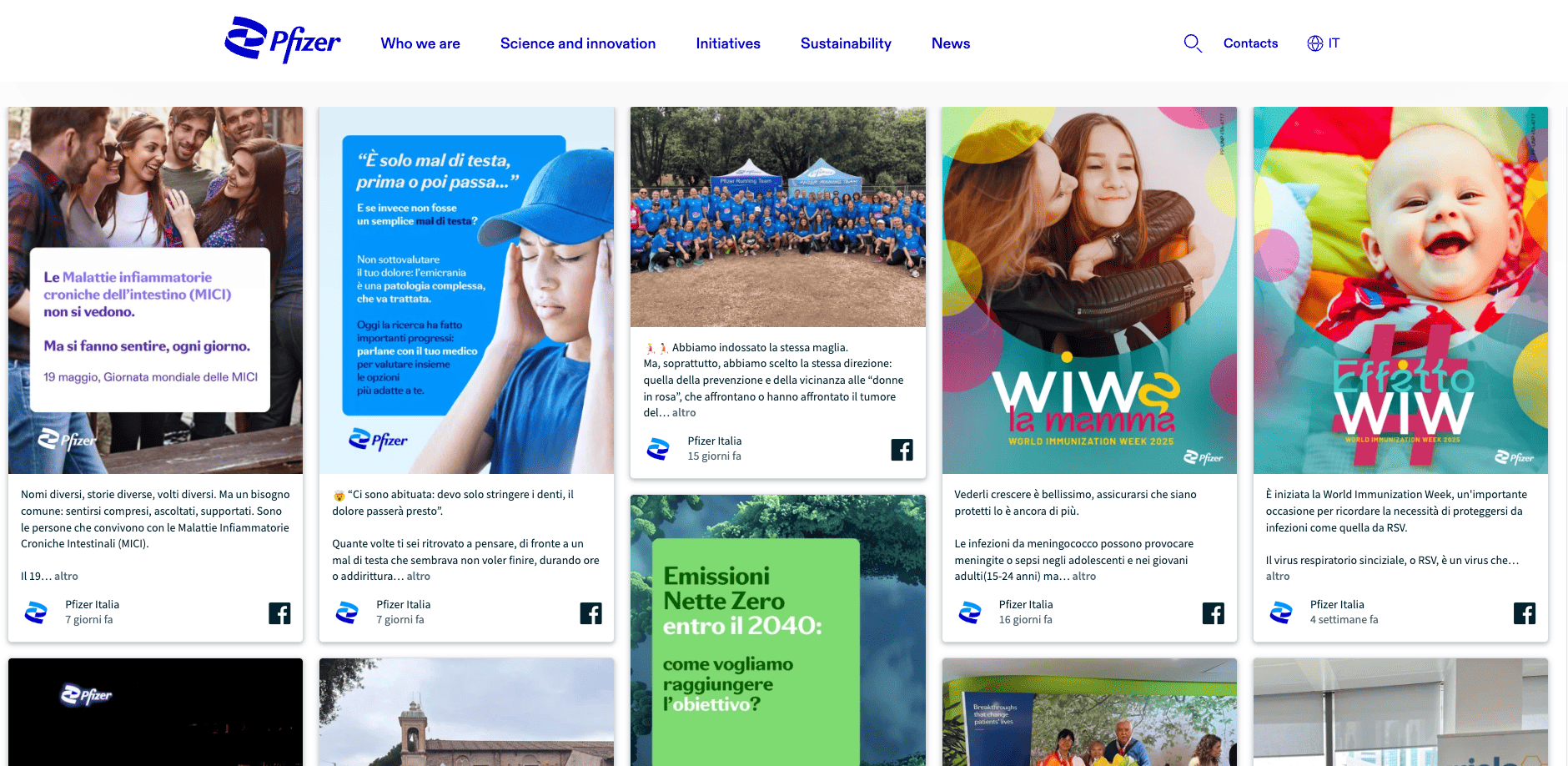
Pfizer Italy displays a grid of Facebook posts directly on its corporate website. Each card draws on the brand's Facebook Page and covers everything from health awareness campaigns to community initiatives to sustainability updates. For a pharmaceutical company operating in a heavily regulated space, a moderated Facebook feed adds a more human, accessible layer to the website. Visitors get a sense of the people, events, and stories behind the brand without leaving the page.
Deutsche Bundesbank
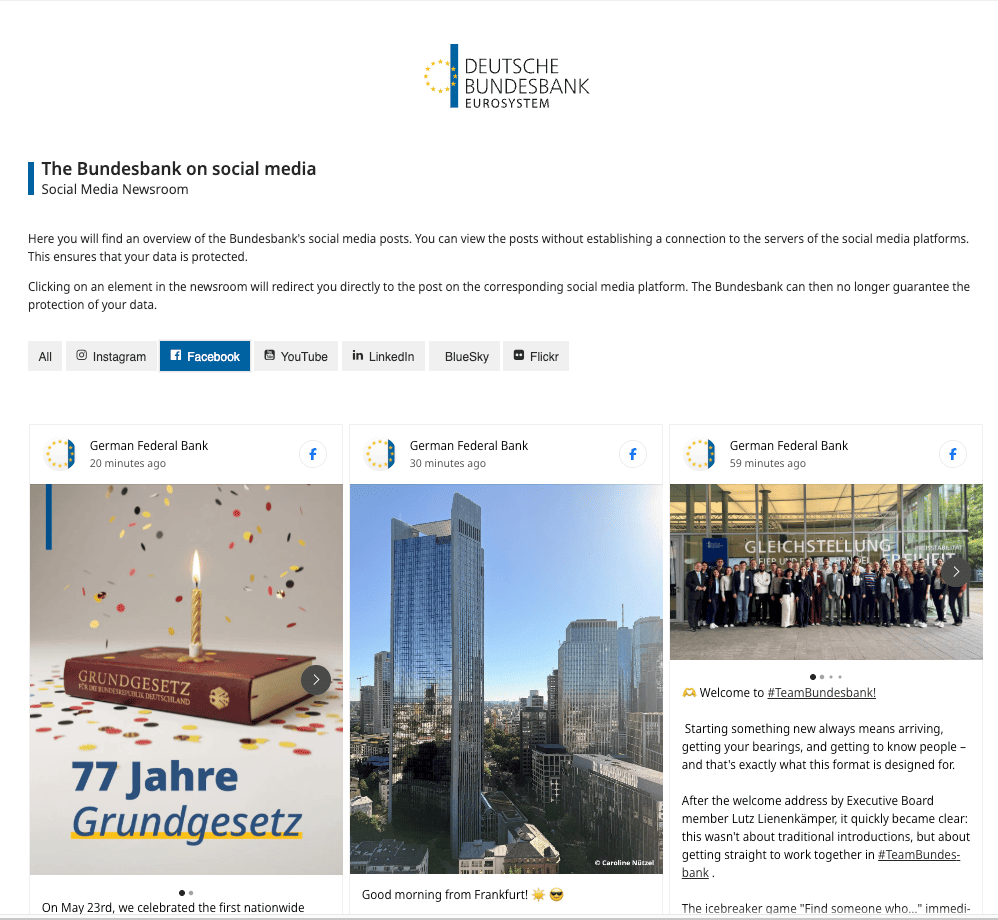
Germany's central bank runs a "Social Media Newsroom" on its Bundesbank news page, with a dedicated Facebook tab that displays posts in a clean grid layout. The setup also lets visitors view content without connecting directly to Facebook's servers, which is a real win for data protection. For an institution where credibility carries weight, the feed brings policy updates, public communications, and the people behind the work into one place.
Alila Hotels
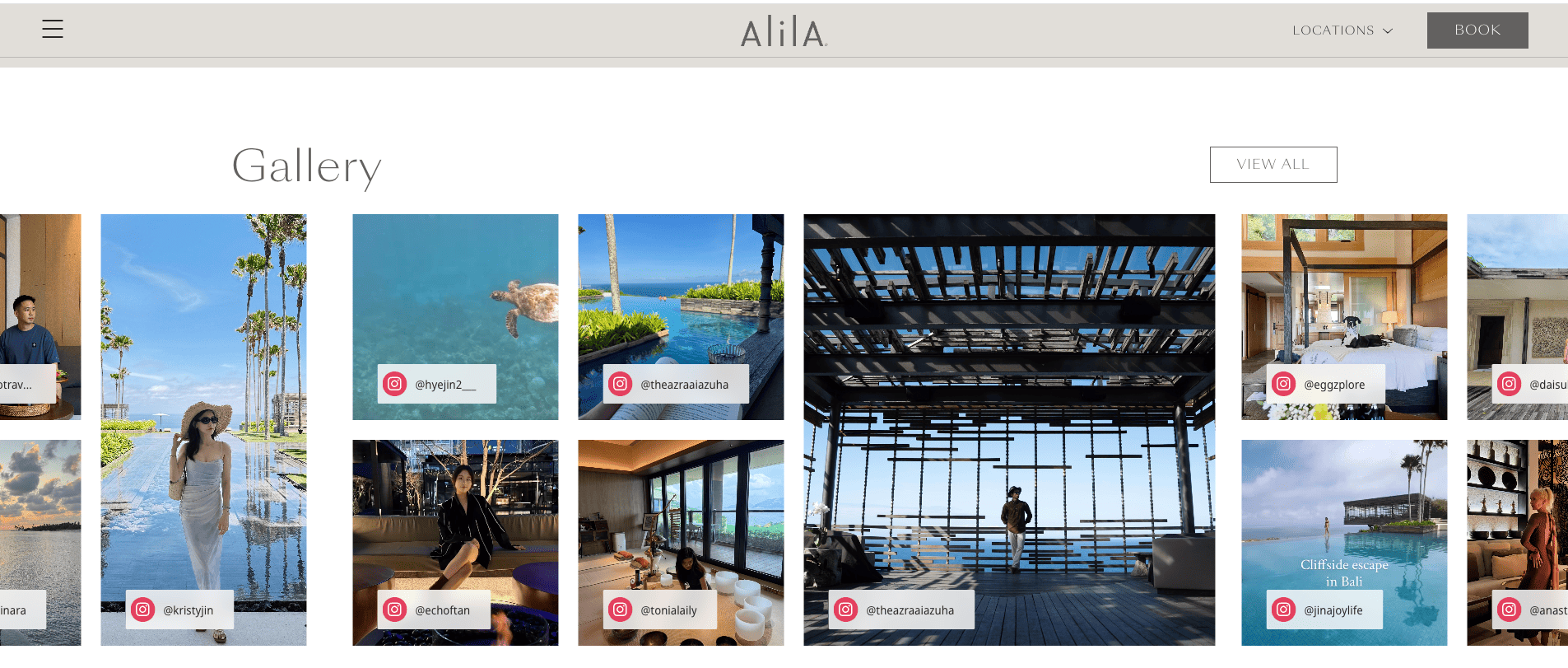
Alila Hotels, part of the Hyatt Group, embeds a social wall on its website, that pulls content directly from its branded social channels. For hospitality, this approach gives prospective guests a real look at the property, the rooms, and the local experiences before they book. The feed updates automatically, so the site never feels static even when the main pages do not change.
FIFA World Cup 26
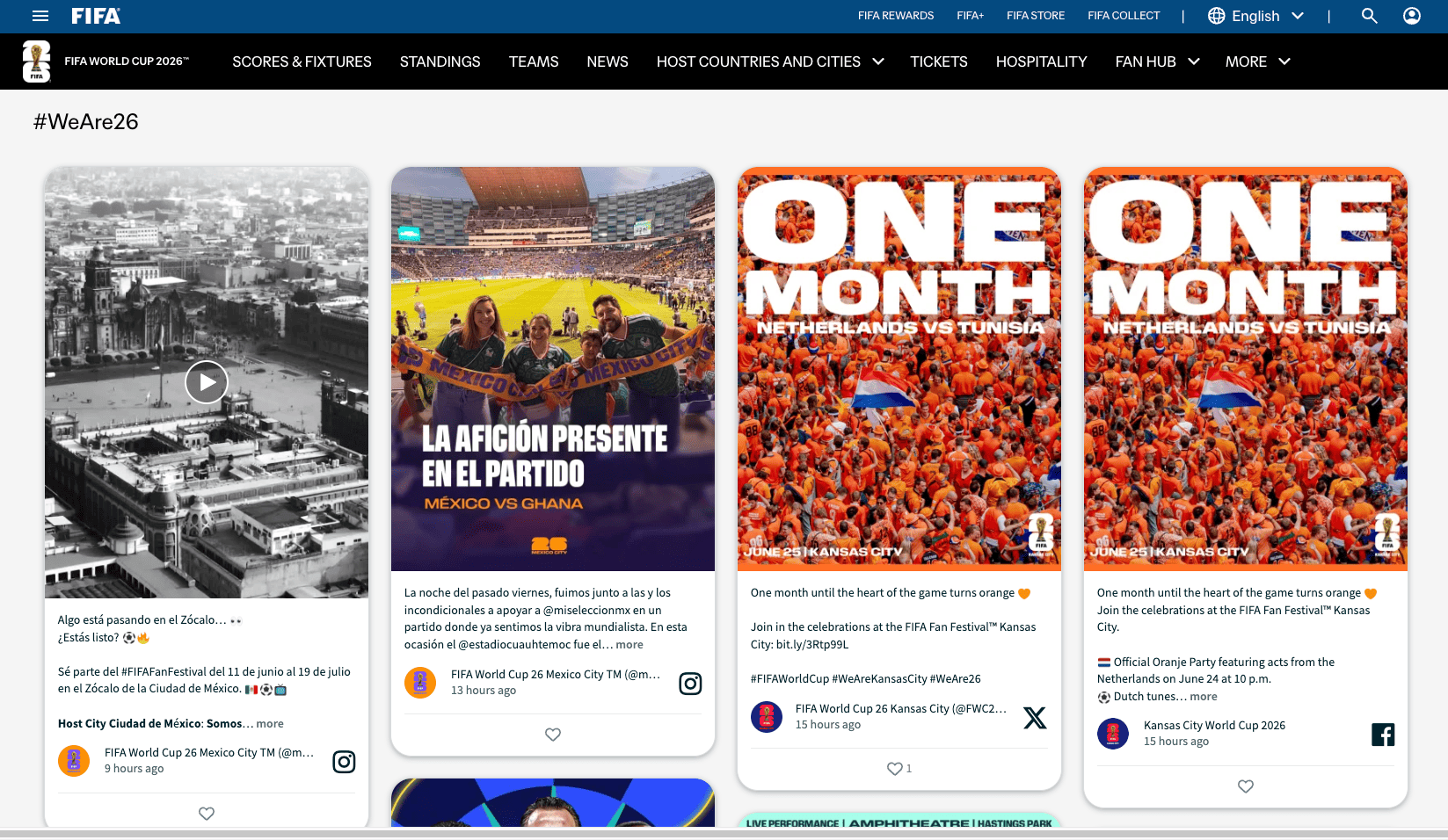
FIFA's World Cup 26 website embeds social walls across landing pages for each of the 16 host cities. The walls combine Facebook posts with content from Instagram, X, and other channels, as well as official tournament updates. For a global event spanning three countries, a multi-channel social wall keeps every host-city page feeling local, current, and connected to the wider tournament without manual content updates.
Where to Place a Facebook Feed on Your Website
Placement decides whether the feed earns attention or gets ignored. Here are the spots that deliver the most value.
Homepage
A social wall or grid above the fold gives new visitors an instant sense of an active, trusted brand. This works especially well for retail, hospitality, and sports.
Product or Service Pages
A carousel of customer content next to product details addresses doubts about quality, fit, or experience. For e-commerce stores, shoppable feeds shorten the path from inspiration to checkout.
News, Blog, or Events Pages
A multi-channel feed adds context to your content. Visitors reading an article or event page see related Facebook posts, photos, and reactions without leaving the site.
Digital Signage
Inside stores, offices, lobbies, or event venues, Flockler's slideshow layout displays Facebook content on screens. The feed updates automatically, so screens stay fresh without staff input.
Intranet or Internal Communications
For larger organizations, a Facebook Page feed within an intranet keeps teams informed about public-facing communications, customer reactions, and recent campaigns.
What to Look for in a Facebook Feed Tool
If you are evaluating tools to embed a Facebook feed in web page sections, these are the features that matter in practice:
- Official Meta API integration. Tools that use unofficial scraping methods often break and risk account issues.
- Multi-platform support. Facebook rarely lives alone. Look for native support for Instagram, TikTok, YouTube, LinkedIn, X, and Google Reviews.
- Custom branding. Colors, fonts, layouts, and CSS access should all be available.
- Moderation controls. Manual review, keyword blocking, and AI moderation help keep the feed on-brand.
- No coding required. A clean embed code or visual editor should be enough.
- Unlimited usage. Some tools charge per layout, per page, or per visitor. Flat-rate subscriptions are more predictable.
- GDPR compliance. Especially relevant for European brands or any site handling EU visitor data.
Flockler ticks each of these. It uses Meta's official API, supports 15+ platforms, includes Garde AI moderation, and runs on a transparent subscription model based on the number of active feeds rather than page views.
Common Mistakes to Avoid When You Embed Facebook Page Feed on Website Pages
A few simple mistakes can hurt the impact of your Facebook feed. Watch out for these:
- Embedding without moderation. Even the cleanest Pages occasionally publish content that does not fit a homepage context. Always set up at least basic moderation rules.
- Forcing one layout everywhere. A carousel that works on a homepage often feels cramped on a product page. Match the layout to the space.
- Ignoring mobile design. Around 60% of Facebook users access the platform from mobile devices. Your embedded feed should display cleanly on small screens.
- Mixing too many sources at once. A feed pulling from 10 pages and 5 hashtags becomes noisy. Start narrow and expand as needed.
- Forgetting accessibility. Use a tool that supports alt text and screen-reader-friendly markup. Flockler's automated alt text feature handles this in the background.
Final Thoughts
A Facebook page feed embedded on your website is one of the simplest ways to add fresh, trust-building content without producing anything new. The standard Facebook Page Plugin handles the basics, but most brands need more flexibility, better moderation, and the ability to integrate with other platforms. A social media aggregator like Flockler covers all of that and works on any website builder in minutes.
If you are ready to embed Facebook page feed on website pages with full control over how it looks and what it shows, start a free trial of Flockler and build your first feed in a few minutes.
FAQs
How Do You Embed a Facebook Page Feed on a Website for Free?
You can use Facebook's official Page Plugin at no cost. It generates a small embed code for a public Page. The plugin has limited customization options and shows only one Page at a time. For more flexibility, a tool like Flockler offers a 14-day free trial with full features.
Can a Facebook Page Feed Be Embedded on Website Pages Without Coding?
Yes. Both the Facebook Page Plugin and Flockler generate embed codes that can be pasted directly into WordPress, Shopify, Wix, Squarespace, Webflow, and most website builders. No development skills are required.
Can Multiple Facebook Pages Be Combined Into One Feed?
The Facebook Page Plugin only supports one Page at a time. With Flockler, you can combine multiple Facebook Pages into a single feed and mix in Instagram, TikTok, YouTube, X, Google Reviews, and other sources.
How Often Does an Embedded Facebook Feed Update?
Flockler refreshes automated feeds every 5 to 15 minutes. New Facebook Page posts appear on your website automatically.
Can Posts Be Moderated Before They Appear on a Website?
Yes. Flockler offers manual moderation, automated rules, and Garde AI for automatic content filtering. You can block specific keywords or usernames and review posts before they go live.
Is It Possible to Display Facebook Reviews on a Website?
Yes, but only for Pages you manage. Once you connect a Page with admin access, Flockler can pull in reviews and recommendations along with regular posts.
Does an Embedded Facebook Feed Slow Down a Website?
A well-built embed loads asynchronously, which means it does not block the rest of the page from rendering. Flockler feeds use this approach, so site speed stays consistent even with multiple embedded feeds.
Maria Prakkat is a SaaS content marketing and SEO strategist with experience across SEO, GEO, and social media aggregation. She writes in-depth, research-backed content that helps businesses understand and apply solutions like social media aggregators, UGC platforms, and content distribution tools to improve visibility and engagement. Her work focuses on clarity, relevance, and long-term impact.
Social infrastructure that scales with you.
Start your free trial, or let us show you the platform in action.



